






Secure Shopping
Easy Payment
Genuine Products
ORDER BY PHONE
0212 543 43 80
Click and leave your number. We will call you.
799,00 TL
Baskistan
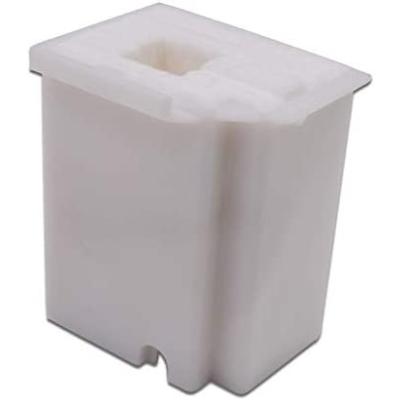
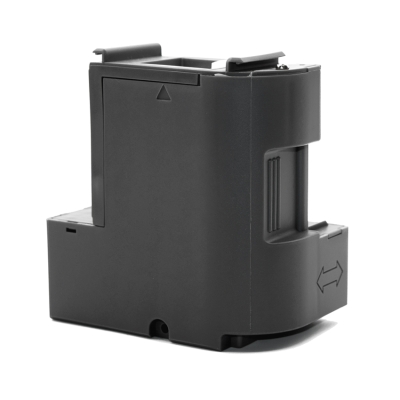
Epson L5390 Maintenance Box Waste Ink Tank C12C939891
799,00 TL
ORDER BY PHONE
0212 543 43 80
Click and leave your number. We will call you.
Baskistan Epson C9891 Waste Box (Maintenance Box) C12C939891
Product Code: C12C939891 | Short Code: C9891
What does this product do? It safely collects waste ink generated during the printhead cleaning operations of your Epson EcoTank printer. When the box is full, a warning appears on the printer screen and it needs to be replaced. This model is the original Epson waste box designed for the new generation EcoTank series released in 2026.
⚠️ Do not confuse it with older models! This product (C12C939891 / C9891) is only for the new generation models listed below. Older models such as L3550, L3560, L5590 use a different waste box (C9344). Be sure to check your printer model.
Product Features
- Original Epson waste ink box
- Special design for the 2026 new generation EcoTank series
- Protects the printer's internal mechanism from waste ink leakage
- Easily installed and removed by the user
- Must be replaced when the printer gives a full capacity warning
- Product Code: C12C939891 / Short Code: C9891
Compatible Printer Models
| Model | Series / Feature | Status |
|---|---|---|
| Epson EcoTank L3350 | EcoTank Entry-Level Series, Wi-Fi | NEW 2026 |
| Epson EcoTank L3360 | EcoTank Entry-Level Series, Color LCD | NEW 2026 |
| Epson EcoTank L5390 | EcoTank Mid-Range, Fax + ADF | NEW 2026 |
| Epson EcoTank L3300 | EcoTank Entry-Level Series | NEW 2026 |
| Epson EcoTank L1350 | EcoTank Print-Only (No Scanner) | NEW 2026 |
| Epson EcoTank ET-2910 | EcoTank Entry-Level Series (Europe) | NEW 2026 |
| Epson EcoTank ET-2920 | EcoTank Entry-Level Series (Europe) | NEW 2026 |
| Epson EcoTank ET-4900 | EcoTank Mid-Range (Europe) | NEW 2026 |
| Epson EcoTank ET-1910 | EcoTank Print-Only (Europe) | NEW 2026 |
How to Replace the Waste Box?
1
Start the replacement process when the warning "Maintenance Box is full" or "Maintenance Box Full" appears on the printer screen.
2
Turn off the printer. Lift the scanner cover; the waste box cover is located inside the printer.
3
Remove the cover and pull the full waste box straight out. Since ink may spill, immediately place it in a plastic bag and seal it.
4
Insert the new C12C939891 (C9891) waste box into place in the correct direction and attach the cover.
5
Close the scanner cover, turn on the printer. The counter resets automatically and the printer continues to operate normally.
⚠️ Important Note: We recommend wearing gloves to avoid contact with ink during waste box replacement. Dispose of the full box in an environmentally friendly manner. Do not hold the waste box tilted, ink may leak.
Baskistan Epson C9891 Waste Box (Maintenance Box) C12C939891
Product Code: C12C939891 | Short Code: C9891
What does this product do? It safely collects waste ink generated during the printhead cleaning operations of your Epson EcoTank printer. When the box is full, a warning appears on the printer screen and it needs to be replaced. This model is the original Epson waste box designed for the new generation EcoTank series released in 2026.
⚠️ Do not confuse it with older models! This product (C12C939891 / C9891) is only for the new generation models listed below. Older models such as L3550, L3560, L5590 use a different waste box (C9344). Be sure to check your printer model.
Product Features
- Original Epson waste ink box
- Special design for the 2026 new generation EcoTank series
- Protects the printer's internal mechanism from waste ink leakage
- Easily installed and removed by the user
- Must be replaced when the printer gives a full capacity warning
- Product Code: C12C939891 / Short Code: C9891
Compatible Printer Models
| Model | Series / Feature | Status |
|---|---|---|
| Epson EcoTank L3350 | EcoTank Entry-Level Series, Wi-Fi | NEW 2026 |
| Epson EcoTank L3360 | EcoTank Entry-Level Series, Color LCD | NEW 2026 |
| Epson EcoTank L5390 | EcoTank Mid-Range, Fax + ADF | NEW 2026 |
| Epson EcoTank L3300 | EcoTank Entry-Level Series | NEW 2026 |
| Epson EcoTank L1350 | EcoTank Print-Only (No Scanner) | NEW 2026 |
| Epson EcoTank ET-2910 | EcoTank Entry-Level Series (Europe) | NEW 2026 |
| Epson EcoTank ET-2920 | EcoTank Entry-Level Series (Europe) | NEW 2026 |
| Epson EcoTank ET-4900 | EcoTank Mid-Range (Europe) | NEW 2026 |
| Epson EcoTank ET-1910 | EcoTank Print-Only (Europe) | NEW 2026 |
How to Replace the Waste Box?
1
Start the replacement process when the warning "Maintenance Box is full" or "Maintenance Box Full" appears on the printer screen.
2
Turn off the printer. Lift the scanner cover; the waste box cover is located inside the printer.
3
Remove the cover and pull the full waste box straight out. Since ink may spill, immediately place it in a plastic bag and seal it.
4
Insert the new C12C939891 (C9891) waste box into place in the correct direction and attach the cover.
5
Close the scanner cover, turn on the printer. The counter resets automatically and the printer continues to operate normally.
⚠️ Important Note: We recommend wearing gloves to avoid contact with ink during waste box replacement. Dispose of the full box in an environmentally friendly manner. Do not hold the waste box tilted, ink may leak.
Havale / EFT (%3) :775,03 TL (KDV Dahil)
Bank-specific installment options:
Bank-specific installment options:
You can return purchased products within 14 days, no questions asked. Returned items must be in their original, undamaged packaging and include the invoice.
We cover the shipping cost for defective products; otherwise, return shipping is paid by the buyer. Please use only Aras Kargo for returns; shipments sent with other carriers will not be accepted by our returns department.
For accepted returns, the refund is issued the same day to the card used for payment (the time it takes to appear may vary depending on your bank).
You May Also Like 👑

 %12
%12 