



• ...
Baskistan

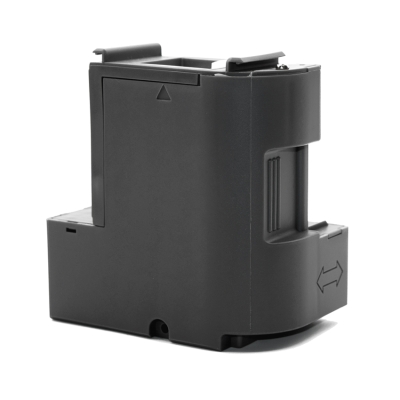
Epson C9891 Maintenance Box (Waste Ink Tank) C12C939891

0 Değerlendirme
Güvenilir Alışveriş Kolay Ödeme Orijinal Ürünler

TELEFONDA SİPARİŞ VER

0212 543 43 80

Tıklayın, telefonunuzu bırakın. Sizi arayalım.

799,00 TL
Baskistan

Epson C9891 Maintenance Box (Waste Ink Tank) C12C939891

799,00 TL

TELEFONDA SİPARİŞ VER

0212 543 43 80

Tıklayın, telefonunuzu bırakın. Sizi arayalım.

Baskistan Epson C9398 Atık Kutusu (Maintenance Box) C12C939891
Ürün Kodu: C12C939891  |  Kısa Kodu: C9398
What does this product do? It safely collects waste ink generated during print head cleaning operations of your Epson EcoTank printer. When the box is full, a warning appears on the printer screen and it needs to be replaced. This model is the original Epson waste ink box designed for the new generation EcoTank series launched in 2026.
⚠️ Do not confuse with older models! This product (C12C939891 / C9398) is strictly for the new generation models listed below. Older models such as L3550, L3560, L5590 use a different waste box (C9344). Be sure to check your printer model.

Product Features

  • Genuine Epson waste ink box
  • Special design for the 2026 new generation EcoTank series
  • Protects the printer's internal mechanism from waste ink leakage
  • Easily installed and removed by the user
  • Must be replaced when the printer displays a fullness warning
  • Product Code: C12C939891 / Short Code: C9398

Compatible Printer Models

Model Series / Feature Status
Epson EcoTank L3350 EcoTank Entry Series, Wi-Fi NEW 2026
Epson EcoTank L3360 EcoTank Entry Series, Color LCD NEW 2026
Epson EcoTank L5390 EcoTank Mid-Range, Fax + ADF NEW 2026
Epson EcoTank L3300 EcoTank Entry Series NEW 2026
Epson EcoTank L1350 EcoTank Printer Only (Without Scanner) NEW 2026
Epson EcoTank ET-2910 EcoTank Entry Series (Europe) NEW 2026
Epson EcoTank ET-2920 EcoTank Entry Series (Europe) NEW 2026
Epson EcoTank ET-4900 EcoTank Mid-Range (Europe) NEW 2026
Epson EcoTank ET-1910 EcoTank Printer Only (Europe) NEW 2026

How to Replace the Waste Box?

1
Start the replacement process when the printer screen shows the "Maintenance Box is full" or equivalent warning.
2
Turn off the printer. Lift the scanner cover; the waste box cover is located inside the printer.
3
Remove the cover and pull out the full waste box straight. Since ink may spill, immediately place it in a plastic bag and seal it.
4
Place the new C12C939891 (C9398) waste box into its slot in the correct orientation and attach the cover.
5
Close the scanner cover, turn on the printer. The counter will reset automatically and the printer will resume normal operation.
⚠️ Important Note: We recommend using gloves to avoid touching the ink during waste box replacement. Dispose of the full box in an eco-friendly manner. Do not keep the waste box tilted, ink may leak.
TOPLAM 799,00 TL
Baskistan Epson C9398 Atık Kutusu (Maintenance Box) C12C939891
Ürün Kodu: C12C939891  |  Kısa Kodu: C9398
What does this product do? It safely collects waste ink generated during print head cleaning operations of your Epson EcoTank printer. When the box is full, a warning appears on the printer screen and it needs to be replaced. This model is the original Epson waste ink box designed for the new generation EcoTank series launched in 2026.
⚠️ Do not confuse with older models! This product (C12C939891 / C9398) is strictly for the new generation models listed below. Older models such as L3550, L3560, L5590 use a different waste box (C9344). Be sure to check your printer model.

Product Features

  • Genuine Epson waste ink box
  • Special design for the 2026 new generation EcoTank series
  • Protects the printer's internal mechanism from waste ink leakage
  • Easily installed and removed by the user
  • Must be replaced when the printer displays a fullness warning
  • Product Code: C12C939891 / Short Code: C9398

Compatible Printer Models

Model Series / Feature Status
Epson EcoTank L3350 EcoTank Entry Series, Wi-Fi NEW 2026
Epson EcoTank L3360 EcoTank Entry Series, Color LCD NEW 2026
Epson EcoTank L5390 EcoTank Mid-Range, Fax + ADF NEW 2026
Epson EcoTank L3300 EcoTank Entry Series NEW 2026
Epson EcoTank L1350 EcoTank Printer Only (Without Scanner) NEW 2026
Epson EcoTank ET-2910 EcoTank Entry Series (Europe) NEW 2026
Epson EcoTank ET-2920 EcoTank Entry Series (Europe) NEW 2026
Epson EcoTank ET-4900 EcoTank Mid-Range (Europe) NEW 2026
Epson EcoTank ET-1910 EcoTank Printer Only (Europe) NEW 2026

How to Replace the Waste Box?

1
Start the replacement process when the printer screen shows the "Maintenance Box is full" or equivalent warning.
2
Turn off the printer. Lift the scanner cover; the waste box cover is located inside the printer.
3
Remove the cover and pull out the full waste box straight. Since ink may spill, immediately place it in a plastic bag and seal it.
4
Place the new C12C939891 (C9398) waste box into its slot in the correct orientation and attach the cover.
5
Close the scanner cover, turn on the printer. The counter will reset automatically and the printer will resume normal operation.
⚠️ Important Note: We recommend using gloves to avoid touching the ink during waste box replacement. Dispose of the full box in an eco-friendly manner. Do not keep the waste box tilted, ink may leak.
Havale / EFT (%3) :775,03 TL (KDV Dahil)

Bankalara özel taksit seçenekleri :

Satın almış olduğunuz ürünleri 14 gün içerisinde koşulsuz iade edebilirsiniz. İade edeceğiniz ürünlerin ambalajları bozulmamış ve faturasının olması gerekmektedir.

Kusurlu ürünlerde kargo bedeli tarafımıza aittir, aksi durumda kargo ücreti alıcıya aittir. Geri gönderimlerde sadece Aras kargoyu kullanınız aksi durumda gelen kargolar iade departmanımız tarafından kabul edilmeyecektir.

İadesi kabul edilen ürün/ürünlerde para iadesi aynı günde işlem yapılan kart hesabına yapılmaktadır, (geri iadeler bankanızın onay süresine göre farklılık gösterebilir)

Bunlar da İlgini Çekebilir 👑 ️
Alışveriş Sepetim

X
WhatsApp destek ekibimiz sorularınızı cevaplıyor.
Merhaba, nasıl yardımcı olabilirim?
WhatsApp Destek Hattı