






ORDER BY PHONE
0212 543 43 80
Click and leave your number. We will call you.
Baskistan Epson C9344 Compatible Waste Ink Tank | L3550, L3560, L5590
ORDER BY PHONE
0212 543 43 80
Click and leave your number. We will call you.
Epson C9344 Compatible Maintenance Box | L3550, L3560, L5590 Compatible
Meta Description: C9344 (C12C934461) compatible waste ink tank for Epson L3550, L3560, L5590 printers. Affordable, chipped, easy installation. Extend the life of your printer!
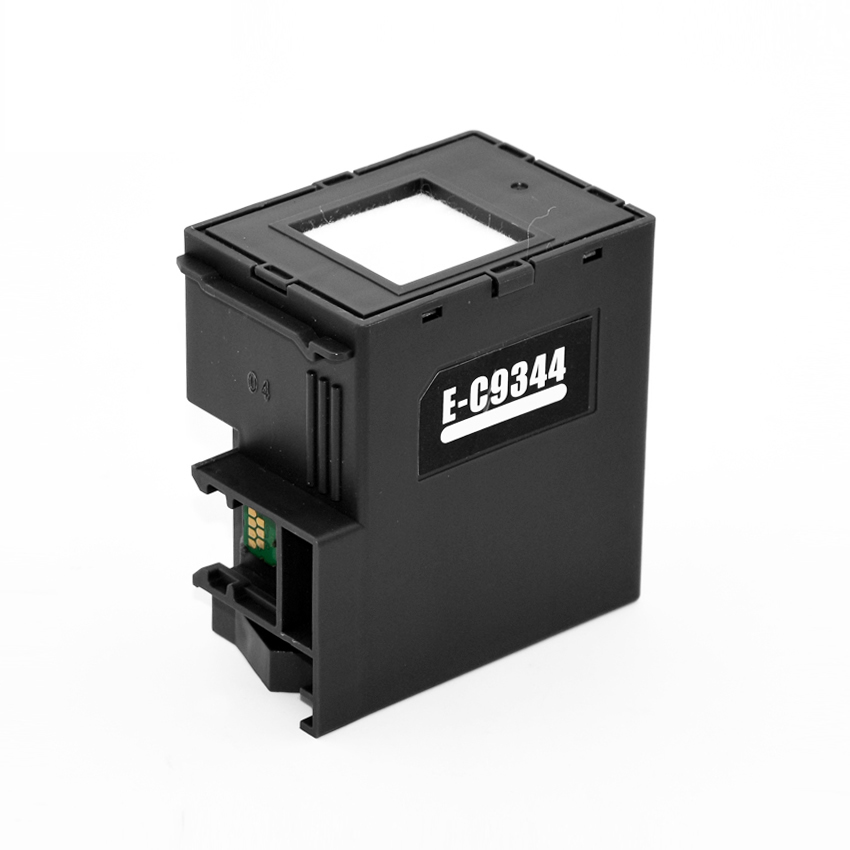
Epson C9344 (C12C934461) Compatible Maintenance Box / Waste Ink Tank
Short Description:
High-quality C9344 (C12C934461) compatible waste ink tank, 100% compatible with your Epson L3550, L3560, and L5590 printers. It allows you to continue your printing operations without interruption by resolving printer warnings such as "waste ink pad is full" or "service required". It is much more affordable compared to the original and helps extend the lifespan of your printer.
Product Details and Description
Excess ink that accumulates over time in Epson printers is collected in the waste ink tank (also known as a maintenance box). When this tank is full, your printer may stop working and display error messages. The Epson C9344 (C12C934461) compatible waste ink tank we offer is designed to solve this problem economically and effectively.
Why Should You Choose This Compatible Maintenance Box?
-
Perfect Compatibility: Fully compatible with Epson L3550, L3560, L5590 printer models.
-
Economical Solution: A budget-friendly alternative compared to original waste tanks.
-
High Quality: Offers reliable performance and long-lasting use.
-
Easy Installation: Plug-and-play feature. Does not require any additional software or complex procedures. It is immediately recognized by your printer thanks to the built-in chip.
-
Extends Printer Life: Regular waste tank replacement helps keep your printer's internal components clean and prevents potential malfunctions.
-
Uninterrupted Printing: Continue printing without encountering the "waste ink pad is full" error.
Technical Specifications
-
Product Code: C9344 / C12C934461 (Compatible)
-
Product Type: Waste Ink Tank / Maintenance Box
-
Chip Status: Chipped (Plug-and-Play)
-
Color: Black
Compatible Printer Models
This C9344 (C12C934461) compatible waste ink tank is 100% compatible with the following Epson printer models:
-

Epson L3550 CISMEA
Product no: C11CK59404

Epson L3560 CISMEA
Product no: C11CK58404

Epson L5590 CISMEA
Product no: C11CK57404
What is a Waste Ink Tank and Why Should It Be Replaced?
Inkjet printers produce a small amount of excess ink during printhead cleaning procedures and normal printing. This excess ink is collected in the waste ink tank, which is a special pad or box located inside the printer. This tank has a capacity, and when it is full, the printer gives an error and stops working. It is important to replace the waste ink tank regularly to ensure your printer continues to run smoothly and to prevent potential leaks.
How Do I Know It Is Time for Replacement?
Usually, warning messages like the following appear on your printer screen or computer:
-
"The waste ink pad is full."
-
"A printer's service life is nearing its end."
-
"Service required."
-
Specific error codes (e.g., E-10, E-11 or other codes for different models)
Installation Instructions
-
Turn off your printer and unplug it.
-
Locate the waste ink tank by referring to your printer's user manual (usually located at the back or side of the printer, behind an easily accessible cover).
-
Carefully remove the old waste ink tank.
-
Properly insert the new C9344 compatible waste ink tank into its slot.
-
Close the cover, plug in your printer, and turn it on. Your printer will automatically recognize the new tank.
(Note: Each model may have its own specific replacement procedure. Please refer to your printer's user manual for the most accurate information.)
Epson C9344 Compatible Maintenance Box | L3550, L3560, L5590 Compatible
Meta Description: C9344 (C12C934461) compatible waste ink tank for Epson L3550, L3560, L5590 printers. Affordable, chipped, easy installation. Extend the life of your printer!
Epson C9344 (C12C934461) Compatible Maintenance Box / Waste Ink Tank
Short Description:
High-quality C9344 (C12C934461) compatible waste ink tank, 100% compatible with your Epson L3550, L3560, and L5590 printers. It allows you to continue your printing operations without interruption by resolving printer warnings such as "waste ink pad is full" or "service required". It is much more affordable compared to the original and helps extend the lifespan of your printer.
Product Details and Description
Excess ink that accumulates over time in Epson printers is collected in the waste ink tank (also known as a maintenance box). When this tank is full, your printer may stop working and display error messages. The Epson C9344 (C12C934461) compatible waste ink tank we offer is designed to solve this problem economically and effectively.
Why Should You Choose This Compatible Maintenance Box?
-
Perfect Compatibility: Fully compatible with Epson L3550, L3560, L5590 printer models.
-
Economical Solution: A budget-friendly alternative compared to original waste tanks.
-
High Quality: Offers reliable performance and long-lasting use.
-
Easy Installation: Plug-and-play feature. Does not require any additional software or complex procedures. It is immediately recognized by your printer thanks to the built-in chip.
-
Extends Printer Life: Regular waste tank replacement helps keep your printer's internal components clean and prevents potential malfunctions.
-
Uninterrupted Printing: Continue printing without encountering the "waste ink pad is full" error.
Technical Specifications
-
Product Code: C9344 / C12C934461 (Compatible)
-
Product Type: Waste Ink Tank / Maintenance Box
-
Chip Status: Chipped (Plug-and-Play)
-
Color: Black
Compatible Printer Models
This C9344 (C12C934461) compatible waste ink tank is 100% compatible with the following Epson printer models:
-
Epson L3550 CISMEA
Product no: C11CK59404
Epson L3560 CISMEA
Product no: C11CK58404
Epson L5590 CISMEA
Product no: C11CK57404
What is a Waste Ink Tank and Why Should It Be Replaced?
Inkjet printers produce a small amount of excess ink during printhead cleaning procedures and normal printing. This excess ink is collected in the waste ink tank, which is a special pad or box located inside the printer. This tank has a capacity, and when it is full, the printer gives an error and stops working. It is important to replace the waste ink tank regularly to ensure your printer continues to run smoothly and to prevent potential leaks.
How Do I Know It Is Time for Replacement?
Usually, warning messages like the following appear on your printer screen or computer:
-
"The waste ink pad is full."
-
"A printer's service life is nearing its end."
-
"Service required."
-
Specific error codes (e.g., E-10, E-11 or other codes for different models)
Installation Instructions
-
Turn off your printer and unplug it.
-
Locate the waste ink tank by referring to your printer's user manual (usually located at the back or side of the printer, behind an easily accessible cover).
-
Carefully remove the old waste ink tank.
-
Properly insert the new C9344 compatible waste ink tank into its slot.
-
Close the cover, plug in your printer, and turn it on. Your printer will automatically recognize the new tank.
(Note: Each model may have its own specific replacement procedure. Please refer to your printer's user manual for the most accurate information.)
Bank-specific installment options:
You can return purchased products within 14 days, no questions asked. Returned items must be in their original, undamaged packaging and include the invoice.
We cover the shipping cost for defective products; otherwise, return shipping is paid by the buyer. Please use only Aras Kargo for returns; shipments sent with other carriers will not be accepted by our returns department.
For accepted returns, the refund is issued the same day to the card used for payment (the time it takes to appear may vary depending on your bank).
You May Also Like 👑

 %12
%12 